
Request Your Transcript FROM SFBU
- Use the SFBU Storefront to create your account.
- Click Order under the name of your school (SFBU).
- You will see two destination options:
- If you are sending your transcript to another school, enter the school's name in the text box.
- If you are sending it to yourself or another individual, select I'm sending to myself or another individual.
- Continue filling in the required fields to place your order.
- On the Provide Consent page, you (or your parent/guardian) authorize Parchment to release your transcript from your school. Sign using your mouse or finger.
- Parchment accepts Visa, Mastercard, Discover, and American Express.
- After payment, you can track your order through your Parchment account.
Send Transcripts TO SFBU
- Go to the Sign Up page and complete the registration form.
- Add a school or organization you currently attend or previously attended.
- Enter your school's name in the search box and click Search.
- When your school appears, enter your email address and complete the remaining fields.
- Click Order under your school's name.
- Search for San Francisco Bay University as the transcript destination.
- Continue filling in the required fields to place your order.
- On the Provide Consent page, authorize Parchment to release your transcript and sign using your mouse or finger.
- Parchment accepts Visa, Mastercard, Discover, and American Express.
- Track your order through your Parchment account.
Important Things to Note
Remember that your school has your transcript. If your order status shows Order Submitted to School, please contact your school if you are concerned about a delay in processing your order.
Electronic and Paper Transcripts
Sending and receiving electronic transcripts is fast, easy, and secure. However, there may be times when you need to send paper transcripts. Since some schools in the Parchment network only accept electronic transcripts, you may not always be presented with a choice of delivery methods.
Electronic Transcripts
The recipient will either receive an email containing a secure link to access your transcript, or, if the recipient is a school that participates in the Parchment network, the transcript will be delivered directly to their Parchment account.
Paper Transcripts
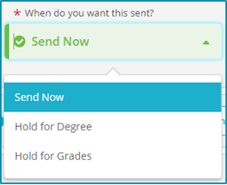
You have two options:
- Send Your Transcript Now
- Wait Until Your Next Grades Are Posted
During the ordering process, you will be presented with a drop-down menu where you can choose whether to wait until your next grades are posted before sending your transcript.
Track Your Order
Visit the Parchment Track Your Order page for complete details, including troubleshooting information if your transcript has not been received.
Need More Help?
Visit the Parchment Help Center or watch their Quick Byte Videos. You can also submit a support ticket if you need additional assistance.