
These are the working kits faculty use at Roots & Branches, SFBU’s annual faculty institute, and the prompts they use between workshops. Anyone may print, run and adapt them.

Each kit has three parts. A facilitator guide explains what the sheet is for and how to run it, with a room or alone. The sheet itself is print-ready at A3. An on-screen guide shows one real course worked all the way through, so you can see what a finished sheet looks like before you start. Read the guide first. The sheets are dense and were designed to be introduced by a person.

Kit 1 Think, Do, Create

Kit 1

Think, Do, Create

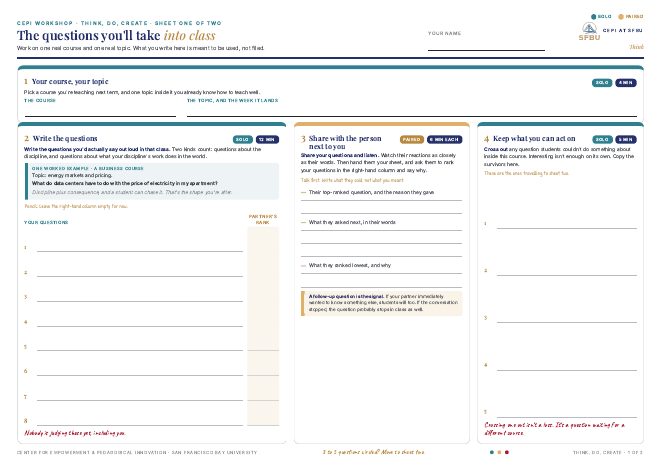
Take one topic from a course you already teach and turn it into a unit. Students ask a question, work with it, and make something that shows what they learned.

Ten steps across two A3 sheets. A faculty member leaves with a unit plan on sheet two and one commitment for the first two weeks of term. It is the Day 1 session at Roots & Branches.

Time

About 40 minutes of work. Allow 60 with an introduction and a break.

Materials

Both sheets printed at A3, one set per person. Pencils. A course you are teaching next term.

Format

Solo, with a partner for three steps. The facilitator guide explains how to run it alone.

What is in the kit

  1. 1

    Facilitator guide

    Two pages. The guide covers what the sheets are for and the ten steps, who does what and for how long. It also explains how to run the session with a room or alone, what a finished sheet looks like and how the AI prompt card fits.

    Download (PDF, 2 pages)

  2. 2

    The workshop sheets

    Two A3 sheets. Sheet one produces the questions. Sheet two turns the survivors into what students do and what they make.

    Download (PDF, A3, 740 KB)

  3. 3

    On-screen guide with a worked example

    Eleven slides, one per step. Instructions sit on the left, and one real course, BUS 310 Markets and Pricing, is worked all the way through on the right. Put it on a screen while people work, or read it to see what a finished sheet looks like.

    Download (PDF, 11 pages, 1.4 MB)

  4. 4

    AI prompt card and how to use it

    Five prompts to run in any AI tool beside the sheets, and a one-page sheet that says which prompt goes with which step. The card was written for an earlier edition of the sheets, so read the one-pager first.

    Download (PDF, A4, 288 KB)

Related: Think, Do, Create, Course Design, and the instruction sheet for the prompt card (PDF, 1 page).
Kit 2 Build the framework you

Kit 2

Build the framework you would trust in your classroom

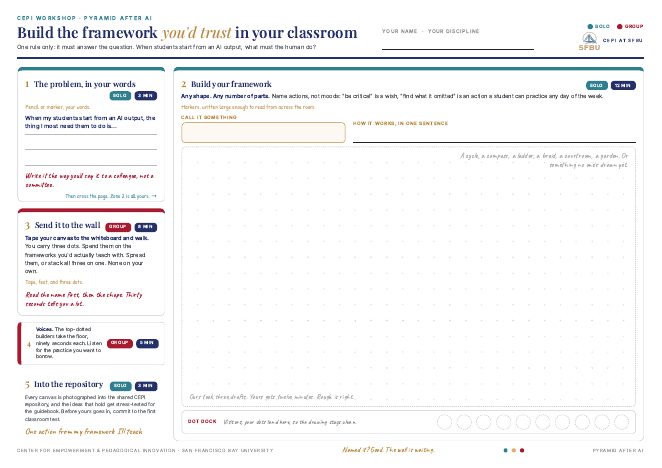
One question, one canvas: when students start from an AI output, what must the human do? Each person draws their own answer for their own discipline, and the room votes with dots.

CEPI’s answer to that question is the Pyramid After AI. The canvas asks faculty to build their own answer first, so the Pyramid arrives as one answer among many. The frameworks a room produces are the product of the session. It is the Day 2 session at Roots & Branches.

Time

About 40 minutes of work. Allow 60 with an introduction and a break.

Materials

Both sheets printed at A3, one set per person. Pencils. A course you are teaching next term.

Format

Solo build, then a gallery walk and three short talks. The facilitator guide explains how to run it alone or in a small group.

What is in the kit

  1. 1

    Facilitator guide

    Two pages. The guide covers the brief and the five zones with timings. It also explains how to run the gallery walk and the dots, what a finished canvas looks like and where to show the Pyramid After AI.

    Download (PDF, 2 pages)

  2. 2

    The workshop sheets

    One A3 sheet with five zones and a large open space for the framework itself.

    Download (PDF, A3, 740 KB)

  3. 3

    On-screen guide with a worked example

    Six slides following one canvas from a marketing course, MKT 310, as it becomes a framework called the Test Kitchen. The example shows how to name each element as an action a student can practice.

    Download (PDF, 11 pages, 1.4 MB)

Related: Teaching with AI and Assessment.

Kit 3 The relationship-rich assignment

Kit 3

The relationship-rich assignment

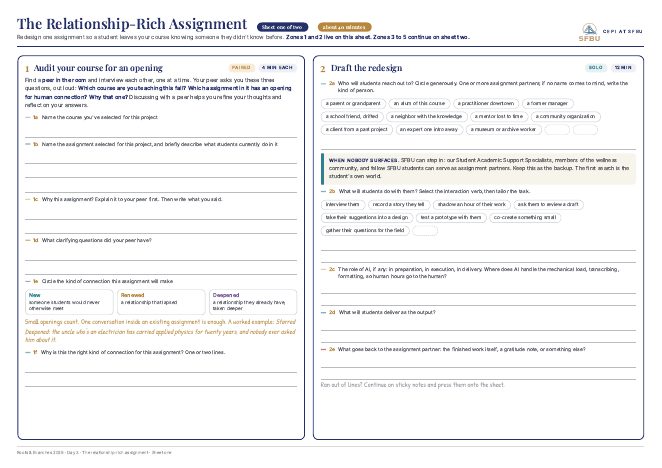
Redesign one assignment so that a student leaves your course knowing someone they did not know before. Something of value should also reach that person.

Two A3 sheets and five zones take one existing assignment through a redesign with a peer review built in. The final version is written for the syllabus. It is the Day 3 session at Roots & Branches.

Time

About 40 minutes of work. Allow 50 with introductions.

Materials

Both sheets printed at A3, one set per person. Pencils, sticky notes, and each person’s own syllabus.

Format

Paired interview, solo draft, paired review, solo final. The facilitator guide explains how to run it alone.

What is in the kit

  1. 1

    Facilitator guide

    Two pages. The three kinds of partner, the two duties of care, the five zones with timings, and what a finished design looks like.

    Download (PDF, 2 pages)

  2. 2

    The workshop sheets

    Two A3 sheets. Sheet one finds the opening and drafts the redesign. Sheet two carries the peer review, the final design and the commitment.

    Download (PDF, A3, 740 KB)

  3. 3

    On-screen guide with a worked example

    Six slides following one assignment from a first-year course. A Workview essay becomes a recorded conversation with an elder, and the slides show the failures the peer review found and how the design absorbed them.

    Download (PDF, 11 pages, 1.4 MB)

Related: Relational Intelligence and Trauma-Aware Teaching.

Free to use and adapt for teaching, with attribution to CEPI, San Francisco Bay University. The sheets carry the attribution already. If you adapt a kit for your own institution, CEPI would be glad to see it: cepi@sfbu.edu.

Prompts for the work between workshops

Ten prompts in five groups. Open one to read it and copy it.

The kits above are for a workshop table. The prompts below are for a faculty member working alone with a syllabus open and an hour to spare. Each prompt takes one piece of a real course and returns text that can be pasted into Canvas. The piece can be a policy paragraph, an assignment brief, a rubric or a page of feedback. The AI writes the draft and the instructor decides what to keep.

They are written to be run in any AI tool. Paste the course text first, then the prompt. For structural reviews of a syllabus, an assignment or the fit between outcomes and assessments, use a model’s slower reasoning setting if it offers one. For wording and tone, the fast setting is enough. Most tools now accept a document as an attachment, which works as well as pasting. Keep student names and grades out of what you paste.

Explore, decide, implement

Every prompt works in the same three steps. Experienced teachers already read their own courses this way.

Explore

Find where the text will confuse a student: the unwritten rules, the missing context, the sentence that takes three readings. Nothing is rewritten at this stage.

Decide

State what this piece of the course is for, what it assesses, and what cannot change. The rewrite follows those decisions.

Implement

Draft the text a student will read. The expectations become clearer and the standard of work stays the same.

All ten prompts share four features. Each ends in text ready to use. Each rewrite makes an expectation plainer and says why it exists. The quality of the result depends on the course material pasted in first, and one run is usually enough, with a follow-up question when needed.

Syllabus

Prompt 01 Syllabus health check

Paste first: Your syllabus, or one section of it.

Read the syllabus above the way a student would on the first day. 1) Identify up to five places where the expectations, tone or logistics will confuse a student, labeling them Issue A to Issue E with a one-line explanation each. 2) For each issue, write a replacement paragraph or bullet list, ready to paste, in plain language written for students (40 to 100 words), keeping the grading rules, the standards, and the link to the learning outcomes already in the syllabus. 3) Provide a one or two sentence course purpose statement tying the syllabus to the learning outcomes. If the text is too long, request one section at a time.

What comes back: Up to five issues with replacement text for each, and a purpose statement for the top of the syllabus. Related: Course Design.

Prompt 02 Syllabus against program outcomes

Paste first: Your syllabus and your program’s learning outcomes. Useful for program chairs.

Using the syllabus and program learning outcomes above, identify gaps, weak mappings, or redundancies between course outcomes, assignments, and program outcomes. For each gap, provide a concise syllabus edit (one sentence) or assignment adjustment (one bullet) that strengthens visible alignment and clarifies how this course contributes to program goals. End with a brief paragraph summarizing the strongest alignment and one prioritized improvement.

What comes back: A gap list with a one-line fix for each, and one improvement to make first.

Related: Course Design.

Prompt 03 Policies, in plain language

Paste first:  The policies section of your syllabus, and any institutional requirements that apply.

Read the policies section above. For each policy that reads as unclear, overly legalistic, or disconnected from learning goals, name the issue in one line and write a direct replacement for students (one to three sentences) that communicates expectations clearly while preserving existing rules. Do not change grading mechanics unless instructed. End with a one-sentence instructor script to introduce the policy in class.

What comes back: Rewritten policy lines you can paste, and a sentence to say in week one.

Related: Trauma-Aware Teaching.

Assignments and rubrics

Prompt 04 Assignment brief: purpose and transparency

Paste first: The full assignment description, and the rubric or grading criteria if one exists.

Read the assignment above. 1) Identify up to five unclear or assumed expectations. 2) Provide a concise purpose statement (one or two sentences) linking the assignment to course outcomes (use the outcomes already in the syllabus if present). 3) For each issue, write a replacement paragraph or step list, ready to paste, (30 to 120 words) clarifying what students must do, how to do it, and how it will be assessed.

What comes back: A purpose statement and replacement paragraphs that state the task, the steps and the criteria. Related: Trauma-Aware Teaching.

Prompt 05 Rubric: design or revise

Paste first: The assignment description, and the existing rubric if you are revising one.

Read the assignment and its learning goals above. For each major goal, state the strongest evidence of learning expected (one line). Then create a concise rubric with three or four performance levels and clear descriptors focused on reasoning, application, and use of evidence. Add a short note on using this rubric for feedback before the final grade.

What comes back: A rubric written as levels of performance, and a note on using it before the final grade. Related: Assessment.

AI in the course

Prompt 06 AI in class: where it helps, where it gets in the way

Paste first: A description of your in-class activities, and your current AI policy if you have one.

Based on the course goals and class activities above, identify where AI use in class supports learning and where it may get in the way of the thinking the activity is meant to produce. For each supported use, write a short guideline (one or two sentences). For each boundary, write a sentence the instructor can say in class. End with a one-line instructor script introducing responsible AI use.

What comes back: Guidelines for the uses that help, boundaries for the ones that do not, and a line to open the conversation. Related: Teaching with AI.

Prompt 07 AI guidance for one assignment

Paste first: The assignment description, and any institutional AI guidelines that apply.

Read the assignment above and identify where AI tools can support brainstorming, drafting, feedback, or revision without replacing the intended learning. For each permitted use, write a short instruction for students and a required one-line reflection prompt documenting AI use. For any prohibited use, provide a brief rationale. Conclude with a single AI statement for the assignment brief.

What comes back: A per-use instruction set with reflection prompts, and one AI statement for the brief. Related: Teaching with AI.

Feedback and participation

Prompt 08 Sharper written feedback

Paste first: A sample of your own feedback, the assignment description, and the rubric or criteria.

Read the feedback sample above for clarity, specificity, and fit with the assignment criteria. Where a comment is vague or general, rewrite it in one to three sentences with a clear next step the student can take. End with a feedback template the instructor can reuse across the pile.

What comes back: Your vague comments rewritten with a next step attached, and a template for the rest of the pile. Related: Assessment.

Prompt 09 More than one way to participate

Paste first: The participation expectations from your syllabus, and a description of your in-class activities.

Read the participation expectations and activities above. Identify participation barriers that may limit engagement for different learners. For each barrier, write an alternative option (one or two sentences) that maintains learning goals while broadening access. End with a one-paragraph instructor script explaining multiple pathways for participation.

What comes back: An alternative route for each barrier, and a paragraph to explain the options to students. Related: What an SFBU Class Feels Like.

Content

Prompt 10 Course content and relevance check

Paste first: Your list of course topics, and the reading list or media.

Read the course topics and readings above. Identify content that may be outdated, narrowly framed, or missing perspectives from outside the field’s mainstream and from the students’ own contexts. For each issue, suggest one specific replacement reading, media source, or activity with a one-line justification. Conclude with a short syllabus note explaining how the course materials support contemporary relevance and intellectual rigor. If the reading list exceeds two pages, limit recommendations to the top five most critical updates.

What comes back: Specific replacements with reasons, and a syllabus note on why the materials were chosen. Related: The PERS Framework.

Getting more from a prompt

If a response runs long, add “Limit to the top three issues.” For long documents, work one section at a time. Add “Do not change deadlines or grading scales” when only the wording needs attention. Ask for the copy-ready text in a code block so it pastes cleanly into Canvas or a syllabus editor. Run a prompt once for a quick revision, or keep the conversation going to refine.

The prompts were first written for SFBU faculty in February 2026 and revised in September 2026. Free to use and adapt with attribution to CEPI, San Francisco Bay University.

Where these come from

Each kit was designed at CEPI for a specific day of Roots & Branches and revised after faculty used it. The prompts were written in the same year for the work faculty do between workshops. The talks that open each day are given in person and are not published. The kits stand on their own with their guides. The linked pages give the thinking behind each one, and the Faculty Guidebook gives it in full.

Experience the sheets in the room

Roots & Branches is open to educators from outside SFBU. CEPI Services describes the institute, and cepi@sfbu.edu is the address for the next date.